 Refmade
Pastel office
Soft colors, sticker cards and round pixel teammates
Even if you have never coded or opened a terminal
Hand off a reply or a website fix to the AI agent on your own computer, in your own words.
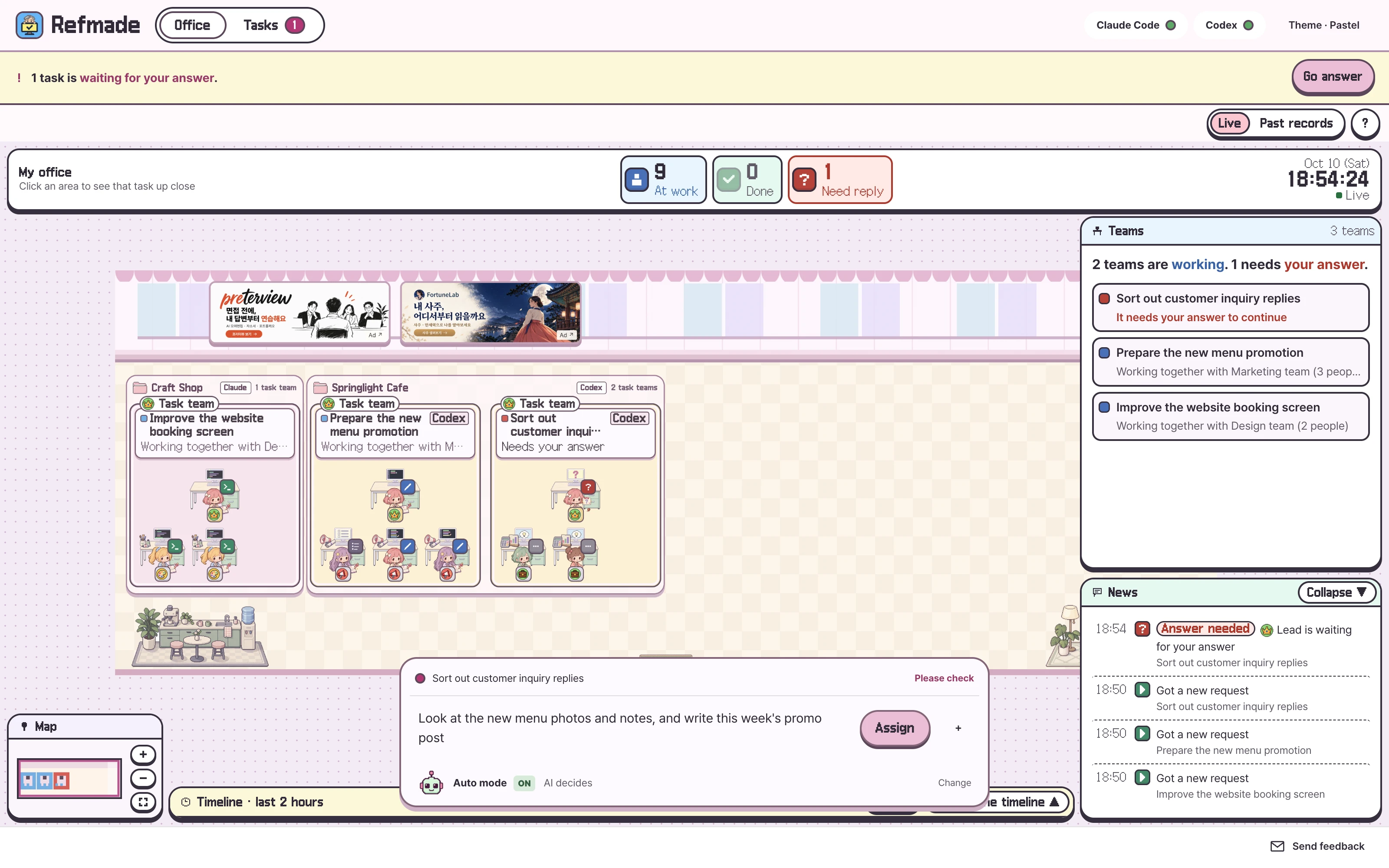
Claude Code and Codex work in a pixel office, and a question mark appears on the monitor when it is your turn to answer.
Mac · version 0.4.0 Windows · version 0.3.2 App is free; AI usage is billed separately
New features and screens below are for Mac. Windows keeps the existing 0.3.2, and its app screens are in Korean only.
Claude Code and Codex on your computer do the work. You give instructions and answer in a window.
Write what you want done in the app’s input box, the way you would say it. You only open the terminal to install.
One input boxWhen the AI asks permission, Refmade explains it in plain words, like ‘Delete the documents folder and everything in it’, and you answer with a button. If it cannot explain a program, it says so.
Plain-word explanationsWhen it reads a file, text scrolls across the monitor. When it runs a program, a bar moves. A ‘✓’ appears when the job is done.
Follows the logsClaude Code and Codex create the document, spreadsheet and web page files right in your folder.
Files, not just answersFollow it one step at a time with real Mac 0.4.0 screens.
Just talk the way you normally do
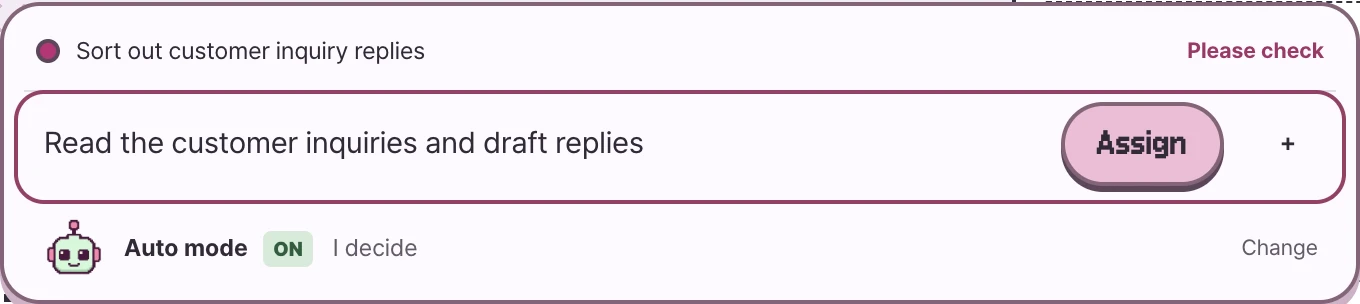
“Read the customer inquiries and draft replies.”
Press ‘Assign’ and a team for that job appears in the office. If your request is too short, Refmade asks back with examples.
Questions that are easy to answer
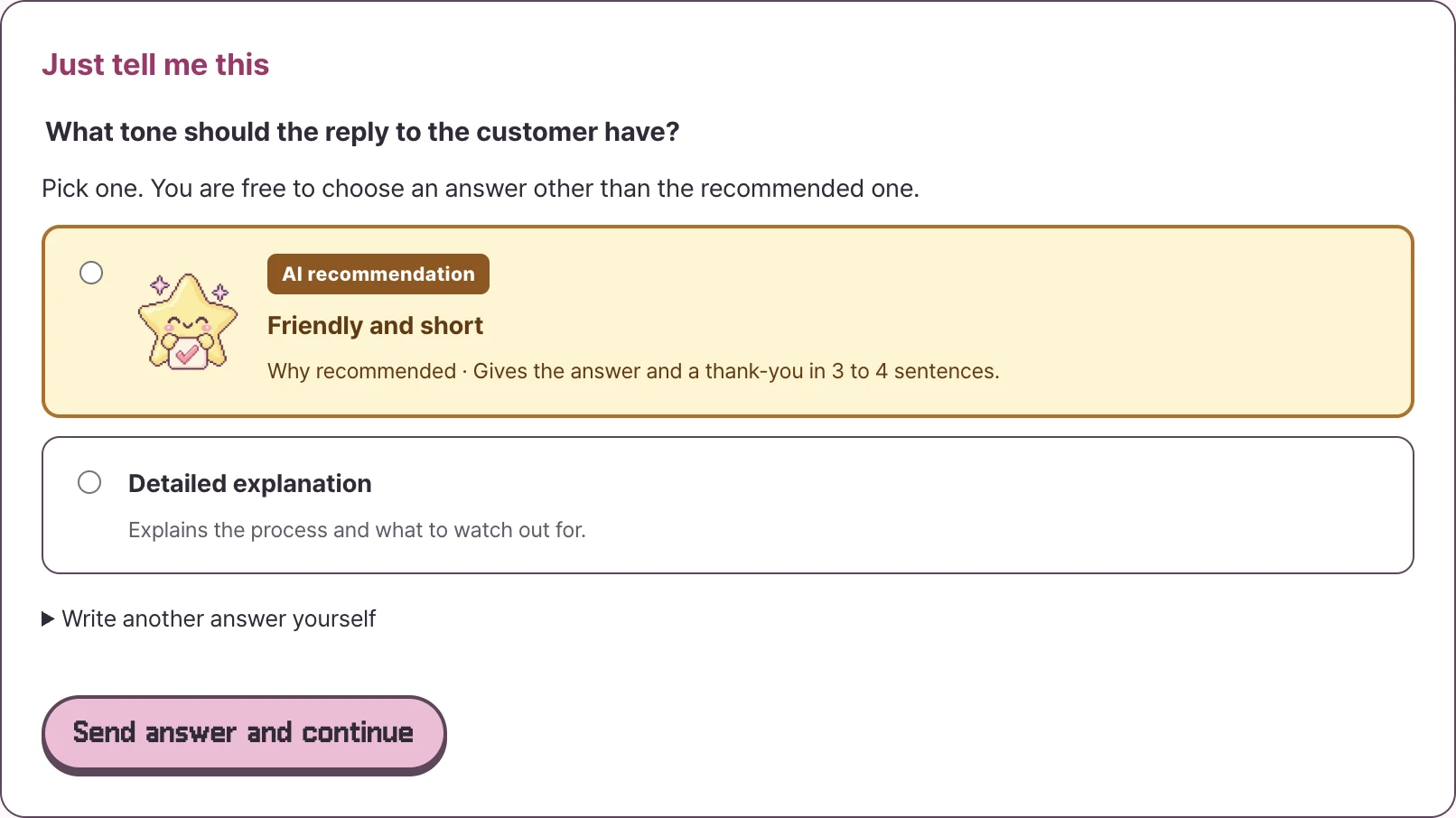
When the AI adds a recommendation, such as “What tone should the reply have?”, you see ‘AI recommendation’ and the reason together.
By default it is ‘I decide’. If you switch Auto mode to ‘AI decides’, the app follows the recommendation only for light choices where the AI gave a recommendation and a reason, such as tone, wording or color.
Ask for changes in words, too
Results are collected in a list. Word (docx), Excel (xlsx) and PDF files open in the apps you already use.
Something like “Make the reply a bit shorter.”
Just keep writing in the same conversation.
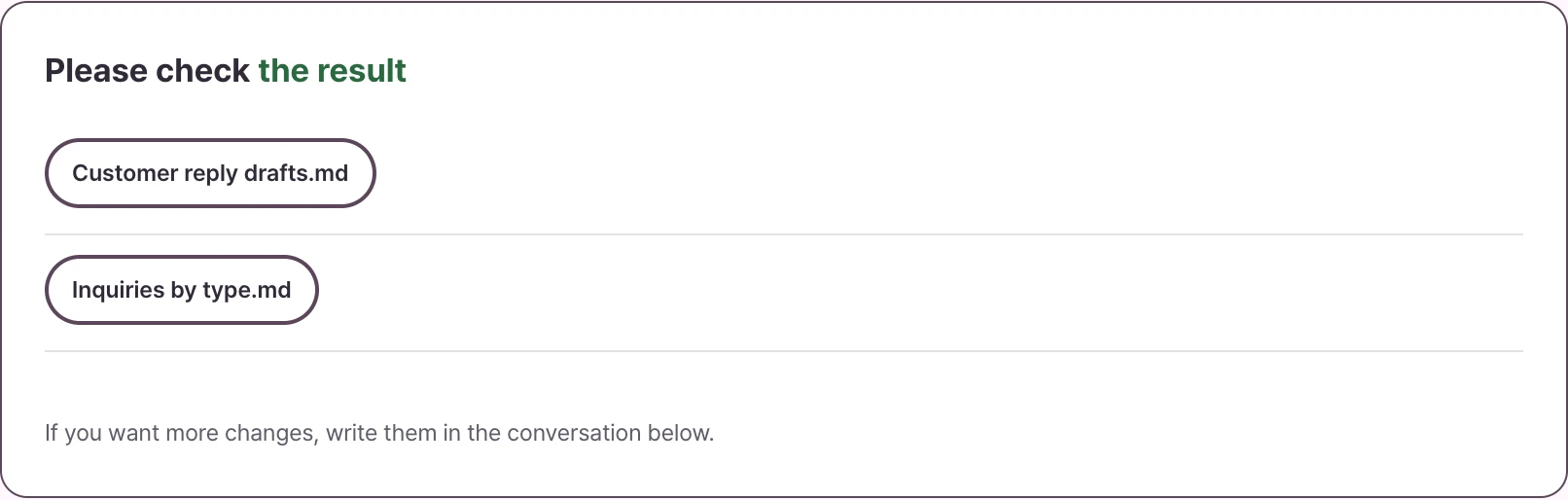
These screens come from a sample task. To use the app you need a Claude Code or Codex connection.
Memory, schedules, undo and two drafts work on Mac: write a sentence like the examples below in a task conversation.
It builds, checks, and fixes any problems up to two times. Even with ‘AI decides’, it still asks you directly about payments, deletions and anything sent outside.
Auto mode · 10 minutes by defaultTeams gather in a zone for each folder, and a bar at the top tells you which jobs need your answer.
Zones by projectWrite your tone or working rules once, and the AI refers to them from the next request in the same task.
Remember to keep wording short
Set an interval and a number of runs. It runs only while the app is open, and each run uses AI quota. It is not a schedule at fixed times.
Summarize the materials every day
It restores a state that was saved automatically. This works for text files only; Word, Excel, Hangul (HWP) and photo files are left out.
Show me the earlier state
It makes two versions on copies. When you apply one, your original changes, and the state from before is kept.
Make two versions
A terminal only scrolls text.
The office reads the Claude Code and Codex logs and draws the work as it happens.
Soft colors, sticker cards and round pixel teammates
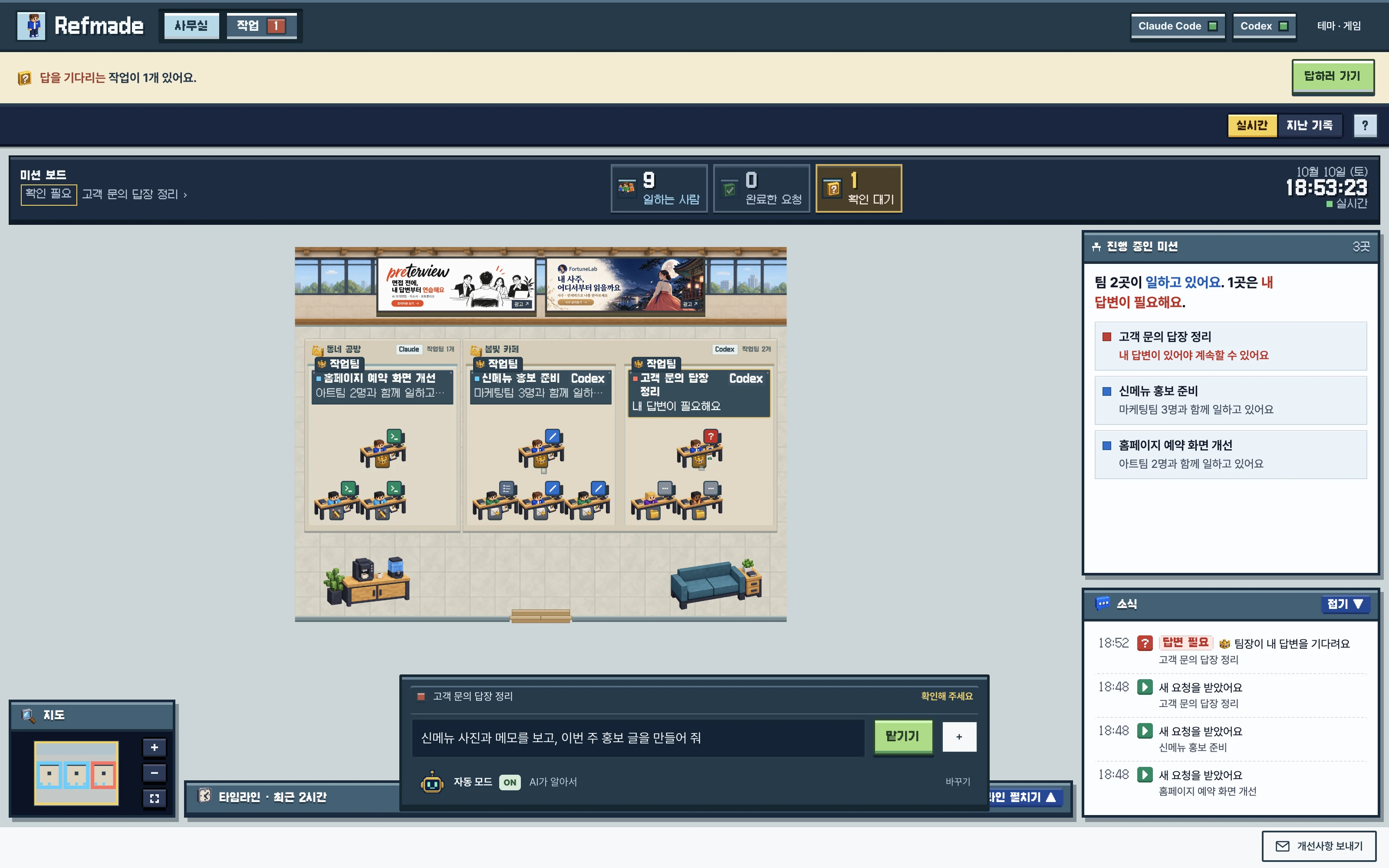
Blocky teammates and a mission board show progress (Mac)
When the AI calls a helper, a new teammate walks in through the door and sits down. When someone finishes, they stretch or have coffee. Helpers get names like Marketing team or Coding team. Jobs you ran in the terminal can show up too.
Team names, headcount and movement depend on your real requests and job status. There are no points or rewards.
File contents needed for a job are sent by your own Claude Code and Codex,
through your own account, to Anthropic and OpenAI.
Your request and the file contents it needs are sent by your Claude Code and Codex to Anthropic and OpenAI, or to a service you connected. Claude Code may also contact Anthropic to check that the AI is ready.
The app fetches the latest version number, and on Mac also the office billboard settings and banners. These requests carry no job content or files. You can turn off the version check with ‘Notify me of new versions’ in the menu. There is no setting to turn off the billboard.
Job content and files, passwords and API keys, usage records and error reports are not sent to Refmade’s servers. Billboard views and clicks are not tracked either. The app only checks whether you are signed in to the AI and which method you use.
The statistics that Claude Code and Codex send follow each tool’s own settings.
The app is free. You use the AI with your own Claude or ChatGPT plan or an API key.
Yes. Refmade is a free app for giving Claude Code and Codex instructions in plain words, so you can start without knowing how to code. When the AI asks permission, Refmade explains it simply, like ‘Delete the file old.txt’. In Mac 0.4.0, you can choose the app’s screens in Korean, English, Japanese, Simplified Chinese, Spanish, Brazilian Portuguese, German or French. The screens of Windows 0.3.2 are in Korean only. During setup you do paste one line into the terminal.
When you hand off work, you use a window, not a terminal. You open the terminal only to install. For Claude Code, copy the line shown by the app’s ‘Open setup guide’ and paste it in. For Codex, install Node.js first, then enter one line.
Yes. Vibe coding means describing what you want to build and letting the AI write the code. Describe a screen in words and Claude Code or Codex creates the files in your folder. On Mac, if the result is a web page that opens right away, Auto mode opens it in your installed Chrome at desktop and phone widths, and fixes it up to two times if it overflows sideways or shows an error.
The app is free. AI usage costs extra. As of October 2026, Claude Code needs Claude Pro or higher, and Codex needs ChatGPT Plus or higher, or a pay-as-you-go API key. Auto mode and repeating schedules on Mac run the AI several times, so they use more.
Not to Refmade’s servers. Your request and the file contents it needs are sent by your own Claude Code and Codex, through your account, to Anthropic or OpenAI. The app only fetches the new version number from refmade.com and, on Mac, the office billboard settings and banners.
It follows each tool’s own permission rules. Claude Code asks with a permission card before it creates or edits files (except for things you already allowed in your settings). Codex can edit or delete files in the folder you choose without asking. For important files, give it a copy of the folder and check the results yourself.
New features are for Mac. Windows 0.3.2 also has the task screen, the plain-word permission cards and the office. Auto mode, AI decides, zones by project, the block-game theme, memory, schedules, undo, two drafts, editing while viewing the page, the billboard, sending feedback and the animated status letters and the eight-language screens are only in Mac 0.4.0, and the Mac app runs only on Apple silicon.
It means the AI’s work is shown as a pixel office. When it searches, results appear on a monitor, and when it makes a plan, checkmarks grow one by one. On Mac there is also a block-game theme with blocky characters and a mission board. There are no points or rewards.
One is enough. The app shows the status of both AI agents, shows setup help for the one that is missing, and a ‘Sign in’ button for one that is not signed in. If you are starting out, Claude Code is easier because setup is one line. On Mac, Auto mode uses Codex first when both are ready.
For Claude Code, paste the one line you are shown and setup begins. After that, you hand off work in the window.
JI Lab service ads